
A late credit card payment can cost you a late fee, interest on the whole bill and a dent in your CIBIL score. A missed electricity bill means a reconnection hassle. And most of the time, the money was in the account. You simply forgot.
Almost every payment app in India now says it will “remind you”. The catch: an app can only remind you about a bill it knows exists. Google Pay knows your electricity bill only if you linked the biller. A calendar knows your rent only if you typed it. An SMS-based tracker knows your card bill because the statement SMS arrived.
So the useful question is not “which app has reminders?” but “what triggers the reminder, and which of my bills will it miss?” Here is that comparison for the apps most Indians already use, plus a few dedicated ones.
Three ways an app learns about a bill

- Biller link. You add your consumer number, card or DTH ID in the app once. It fetches the bill amount and due date from the biller and reminds you. Used by Google Pay, PhonePe, Paytm and CRED.
- Reading SMS. The app spots the statement or bill SMS your bank or biller sends and creates the reminder itself. Used by SkyloFin and axio.
- Manual recurring reminder. You set “₹15,000 rent, 5th of every month” and the app repeats it. Used by Cashew, Money Lover and most budget apps.
Each has blind spots. Biller links cover utilities and cards well but not your landlord or your child’s tuition teacher. SMS covers anything that sends you a message but nothing that does not. Manual covers everything, as long as you set it up and keep it current.
The comparison
| App | Reminder trigger | Good for | Watch out for |
|---|---|---|---|
| Google Pay | Linked biller | Electricity, DTH, broadband, FASTag, LPG | Only billers you have linked |
| PhonePe | Linked biller, or reminders you set | Utilities, card bills, insurance, fees, taxes | Mainly a payments app |
| Paytm | Linked biller; rent reminders | Utilities, EMIs, rent paid through Paytm | Rent reminders tied to paying rent on Paytm |
| CRED | Cards and billers added in the app | Several credit cards, utilities, autopay | Card focus; not a full expense tracker |
| Jupiter | Bill reminders in its money tools | Users who bank with Jupiter | Built around its own account and cards |
| axio (was Walnut) | Bank and card SMS | Card dues, utility bills | Also a lending app |
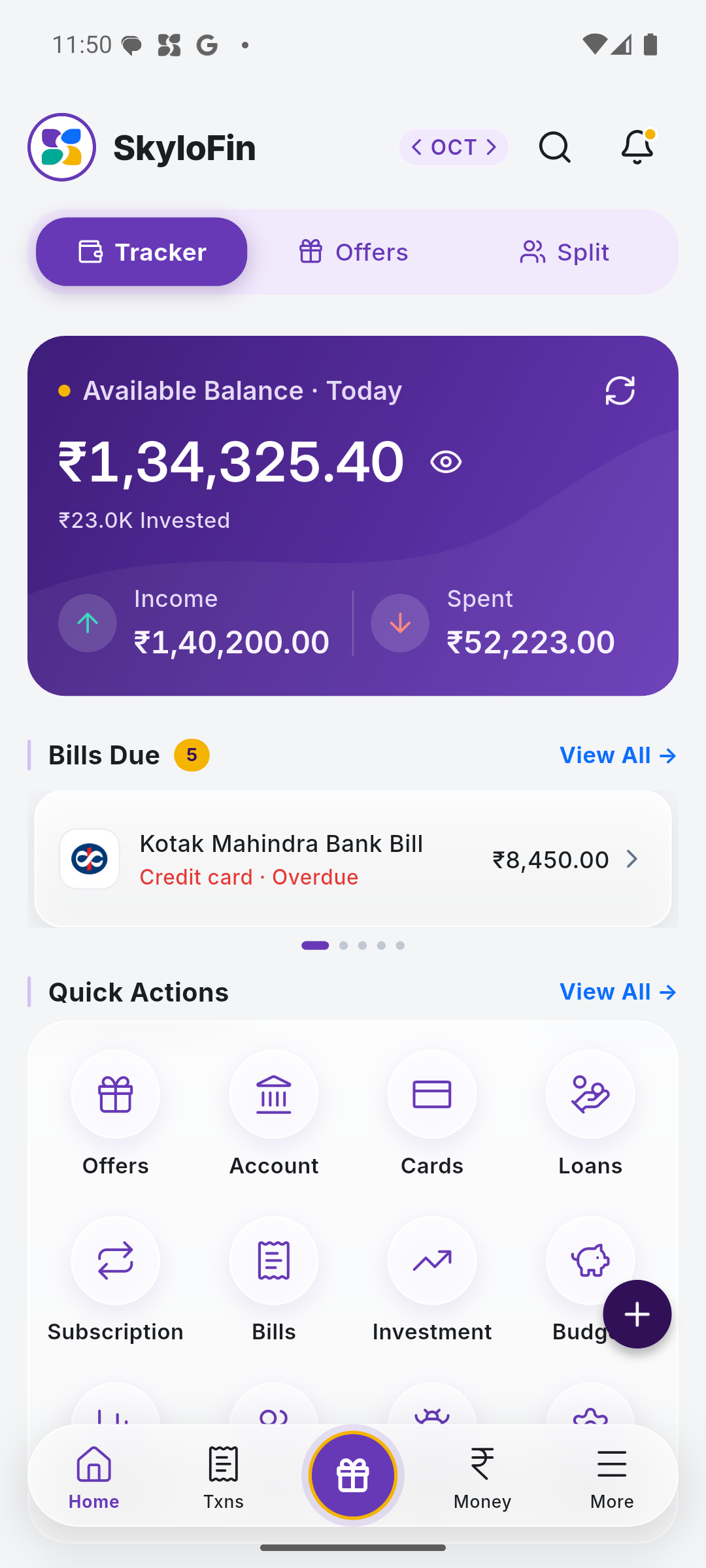
| SkyloFin | Card statement SMS; bills you add | Card dues across banks, plus bills you set | Android only; does not pay bills |
| Cashew, Money Lover | Recurring entries you set | Rent, maid, school fees, anything regular | You must set up each one |
Payment apps: Google Pay, PhonePe and Paytm
These are the easiest place to start because you already have them. Google Pay’s listing puts it simply: link your biller accounts once, and it reminds you to pay. PhonePe advertises automated bill reminders for recharges and utilities, and lets you set reminders for premiums, fees and taxes. Paytm covers a long list of utilities and EMIs, and offers reminders and monthly receipts for rent paid through Paytm.
Strength: reminder and payment sit in the same place, so paying takes a few taps. Weakness: each app knows only the billers you added to that app. If your electricity is on Google Pay and your card bill is on PhonePe, no single app has the full list.
CRED: built for credit cards
CRED’s listing focuses on managing several credit cards in one app, paying card and utility bills, setting up autopay for recurring bills and getting automatic reminders. It also says it can spot hidden charges and duplicate spends on your cards. If you hold three or four cards with different due dates, that focus is useful.
It is not designed to track your bank account spending or UPI payments to shops, so it answers “when is my card due?” rather than “where did my salary go?”
Jupiter and axio: reminders inside a bigger app
Jupiter’s listing mentions tracking bank accounts in one place, a monthly budget and regular bill reminders, alongside its own account, cards and loans. axio, formerly Walnut, reads bank SMS and reminds you about card dues and utility bills such as electricity, DTH, gas, mobile and Wi-Fi, alongside its lending and FD products. Both are solid if you already use them for something else.
SkyloFin: reminders from your statement SMS
Our app, so weigh this accordingly. SkyloFin reads your bank and card SMS on the phone. When your card statement SMS arrives, it picks up the bill amount and due date and reminds you before the due date. You can mark the bill paid, and pay it from whichever app you like. You can also add other bills and subscriptions yourself, so rent, OTT renewals and the gym fee sit in the same list.

Limits: it does not pay bills or move money. A utility bill that never sends you an SMS has to be added by hand. Android only, and some bank formats are still being added. More in bills and reminders.
If you want every card due date in one list without linking anything, SkyloFin is free on Android, with no ads and no bank login.
Budget apps: Cashew and Money Lover
For bills that never send an SMS and are not on any biller list, such as rent paid to a landlord, the cook’s salary or tuition fees, a manual recurring reminder is the only reliable option. Cashew’s listing mentions automatic reminders for subscriptions, recurring expenses and upcoming payments. Money Lover offers recurring transactions with reminders. Your phone’s own calendar or clock app also works if you prefer not to install anything.
A simple system that covers every bill
You do not need one perfect app. You need every bill to be in at least one place that will nag you. A setup that works for most salaried people:
| Bill | Where to set the reminder |
|---|---|
| Credit cards | An app that reads statement SMS, or CRED |
| Electricity, gas, DTH, broadband | The UPI app you pay them with, biller linked |
| Rent, maid, school fees | A recurring reminder in a budget app or calendar |
| OTT and app subscriptions | A subscriptions list; see subscriptions |
| Loan EMIs | Auto-debit, plus a reminder 3 days early to keep the balance ready |
Set every reminder for three to five days before the due date, not on the day. Salary on the 1st and a card due on the 3rd is a common clash; the early nudge lets you move money in time.
Frequently asked questions
Does paying only the minimum due count as paying on time?
It avoids the late fee, but interest runs on the unpaid balance. See what the minimum due really costs.
Can one app remind me about all my bills?
Only if you add every bill to it. Biller-linked apps miss rent; SMS apps miss bills with no SMS; manual apps miss what you forget to enter. Combining two usually works best.
Is autopay better than reminders?
Autopay removes the risk of forgetting, but you still need money in the account on the day. Keep a reminder a few days early even with autopay.
Do I need to pay through the reminder app?
No, not with SkyloFin or calendar-style reminders. Biller-linked reminders in payment apps are designed to lead to payment in that app, but you can pay elsewhere.
A reminder is only as good as its list of bills. If you want card dues found for you from SMS, get SkyloFin free on Android.
Last checked: October 2026.
Updated 20 Oct 2026.